Works with Shopify Checkout

Reward the right carts. Block the wrong orders.

Cart upsells, automatic gifts and volume pricing that lift order value. Address, payment and delivery rules that stop the orders you can't fulfil. No code.

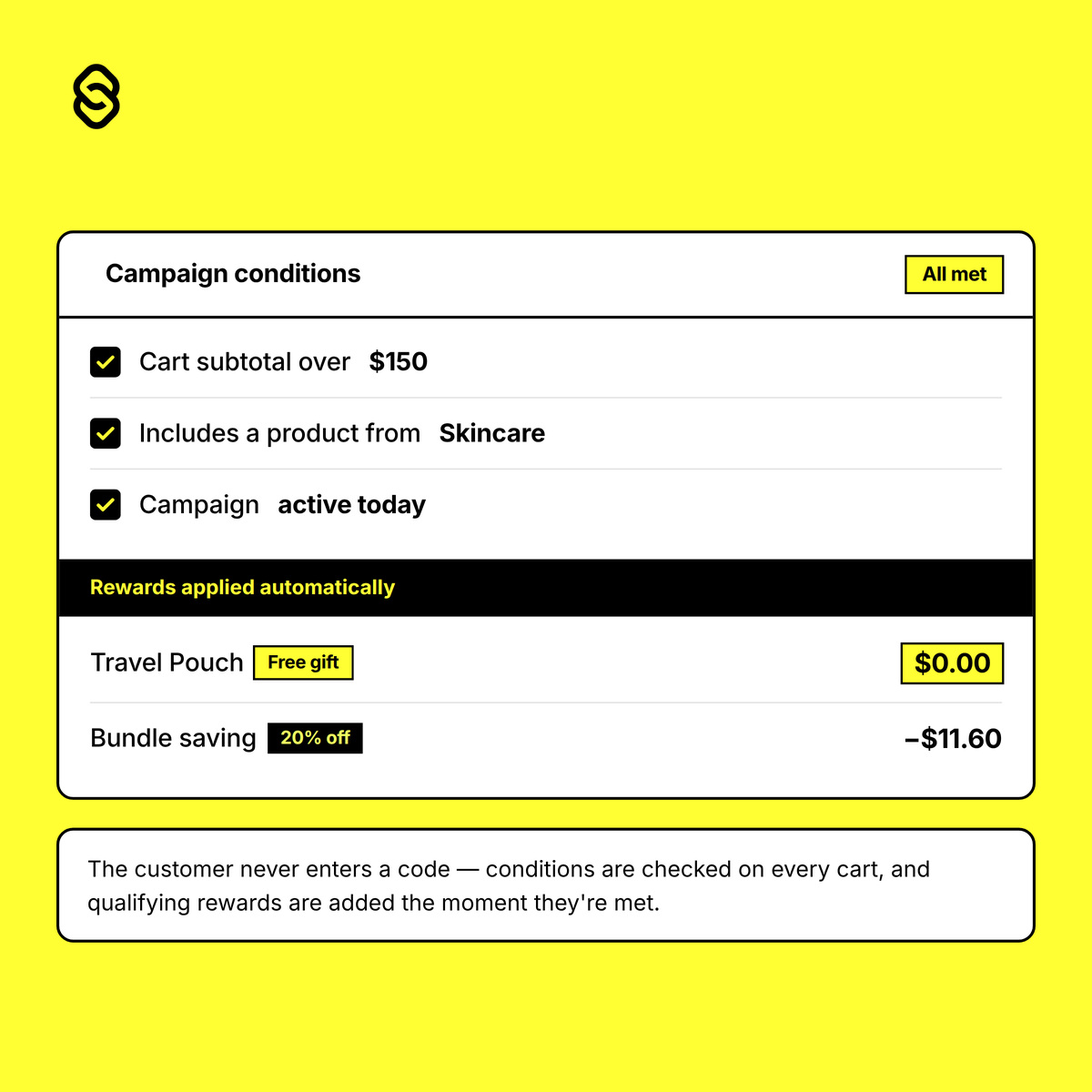
Turn Every Cart Into an Opportunity

Automatically reward customers with free gifts and targeted discounts when they meet your campaign conditions.

  • Automatically add qualifying gifts to the cart
  • Apply percentage, fixed-amount or fixed-price discounts
  • Create BOGOF, bundle and mix-and-match offers
  • Trigger rewards using products, collections or cart value
Start Selling Before Checkout

Most of the decision happens in the cart. Add recommendations, progress bars and tiered pricing where customers are still shopping, on any Shopify plan.

Cart Upsells

Show "You may also like" recommendations in the cart drawer and cart page, with one-click add that never leaves the page

Free Shipping Bar

Encourage bigger baskets with a free shipping progress bar that updates as the cart changes

Volume Pricing

Offer volume pricing that rewards quantity, with a banner showing the next tier they could unlock

Automatic Gifts

Add a free gift to the cart automatically when customers hit your threshold, and remove it if the cart drops back below.

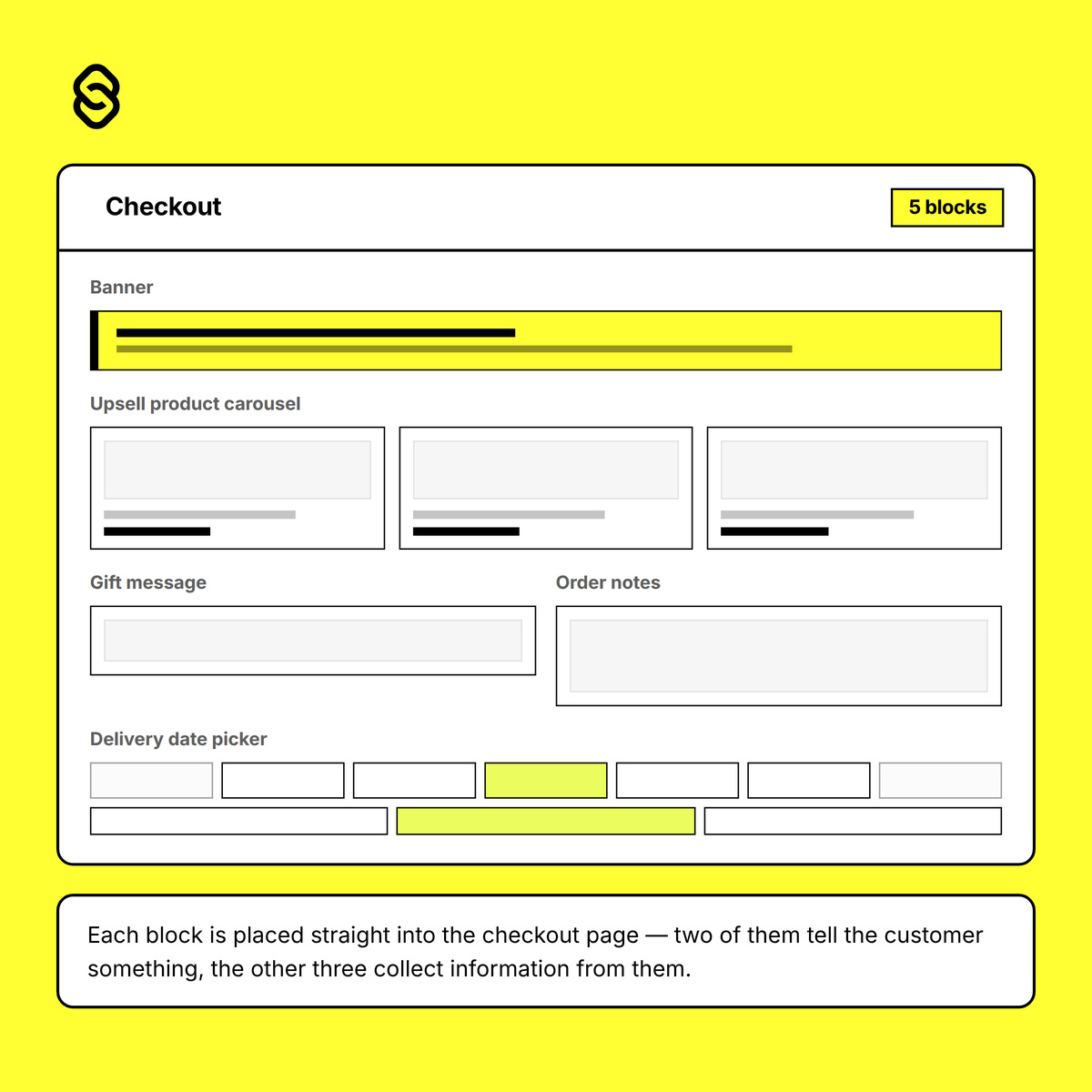
Build a Smarter Checkout Experience

Add useful content to your checkout and thank you pages, and collect the information you need to fulfil every order.

  • Post-purchase upsells and banners on the thank you and order status pages — any plan
  • Banners with images and buttons inside checkout — Plus
  • Upsell carousels inside checkout — Plus
  • Gift messages, order notes and special instructions — Plus
  • Delivery date and time slot selection — Plus

Powerful Checkout Customisation, Without the Complexity

Smart Checkout gives Shopify merchants greater control over promotions, checkout content, order validation, and payment and delivery methods—all without custom development.

Gifts and Discounts

Automatically add free gifts or apply percentage, fixed-amount and fixed-price discounts when customers meet your campaign conditions.

Checkout Content Blocks

Add banners, product upsells, gift messages, order notes and delivery date selection directly to checkout.

Checkout Validation

Validate address formats, block unsupported delivery locations and enforce minimum or maximum order values before an order is placed.

Payment Method Controls

Hide, rename or reorder payment methods—including express payment options—using flexible checkout conditions.

Delivery Method Controls

Control which shipping methods customers see and customise their names and display order based on each checkout.

Flexible Rules and Automation

Target features using cart, product, collection, customer and location conditions. Schedule campaigns and manage stacking, priorities and exclusive offers.

How we compare

Native discounts cover the basics. Here's where they stop, and what Smart Checkout does instead.

Native Shopify discounts
Smart Checkout
Free gift with purchase
Shopper has to find and add the gift themselves, or the discount never applies
Gift is added to the cart automatically the moment they qualify, and removed if the cart drops back below
Spend thresholds
Set one threshold per discount
Tiered campaigns, with priority and stacking rules when several could apply at once
Mix and match
Buy X get Y is fixed at the product or collection you name
Quantity rules across collections, with your own qualifying logic
Overlapping promotions
Buy X get Y items are locked out of other product discounts
You decide what stacks, what's exclusive, and which campaign wins
Checkout content
Nothing. Discounts are a price change, not a checkout experience
Upsells and banners on the thank you page on any plan. Banners, upsells, gift messages and delivery date pickers inside checkout on Shopify Plus.
Order rules
Nothing. Discounts can't block a bad address or hide a payment method
Address validation, order minimums, payment and delivery method rules
Volume pricing
Fixed quantity breaks only, with no way to show customers the next tier
Multi-tier campaigns with a cart banner showing what adding one more unlocks
Post-purchase upsell
Not possible. A new order means a new checkout
Added to the existing order through Shopify's Order Edit API, with no second checkout
Discounts and pricing run on Shopify's own Functions APIs, so they apply server-side with no flash of un-discounted prices. Cart content is added as app blocks through the theme editor, so it works on any theme and disappears cleanly if you uninstall.

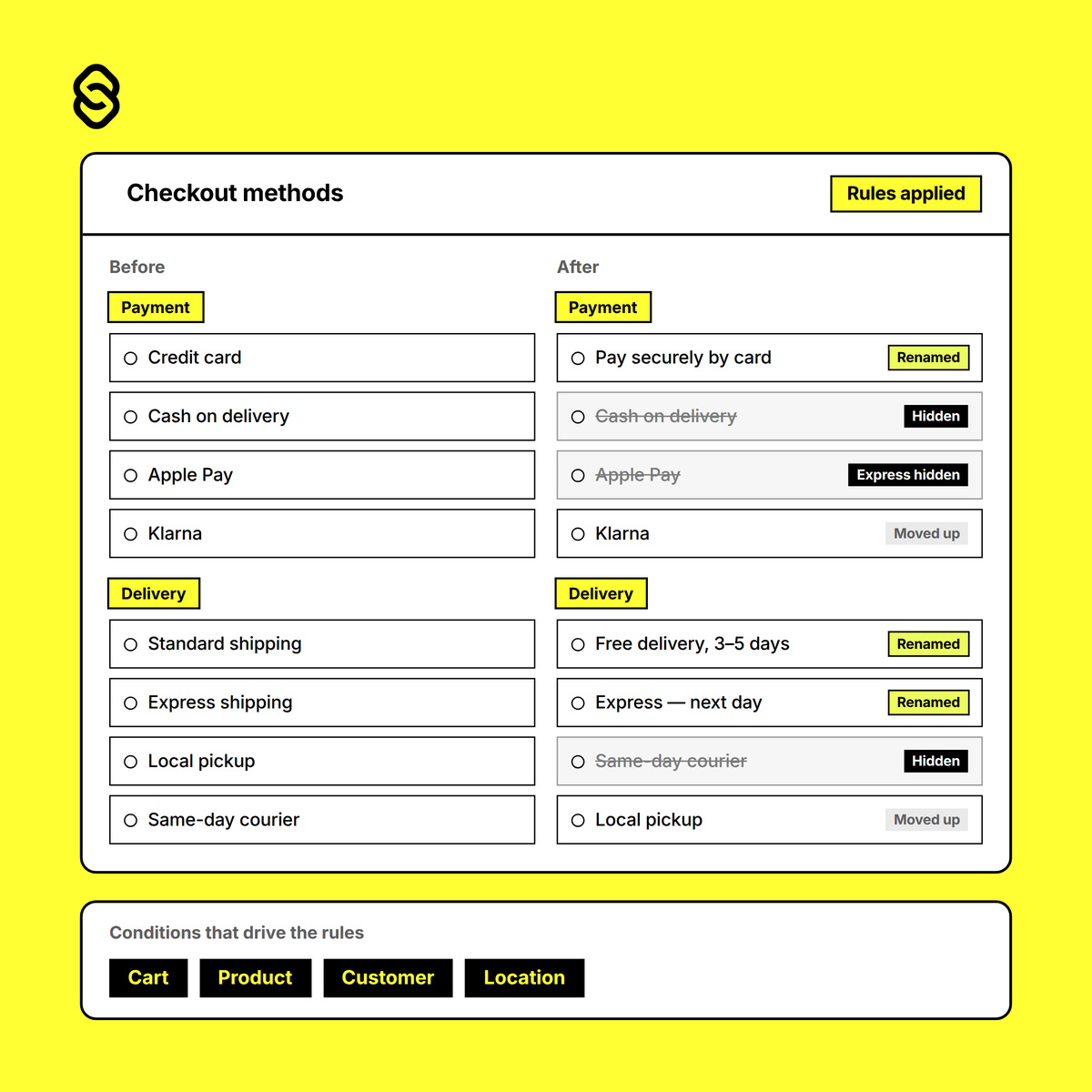
Take Control of Payment and Delivery

Hide, rename or reorder payment and delivery methods using flexible cart, customer, product and location conditions.

  • Hide unsupported payment and delivery methods
  • Control express options such as Apple Pay and Shop Pay
  • Rename methods with custom labels, prefixes or suffixes
  • Reorder methods to prioritise preferred options

One App, From Cart to Confirmation

Gifts, upsells, pricing rules and checkout controls, working together across the whole purchase. Configured in your Shopify admin, no developer required.

Cart Upsell

Recommend products in the cart drawer and cart page. Customers add them in one click without leaving the page, and the block updates as the cart changes.

Free Shipping Bar

Show customers exactly how much more they need to spend to qualify for free shipping. The bar fills as they add items and switches to a congratulations message once they get there.

Volume and Tiered Pricing

Buy 2 save 10%, buy 4 save 20%, buy 6 save 30%. Set percentage, fixed amount or fixed bundle pricing across products or collections, with a cart banner showing customers what the next tier unlocks.

Post-Purchase Upsell

Recommend products on the thank you page and add them straight to the existing order. No second checkout, no re-entering payment details. The customer gets an invoice for the difference.

Display Conditions

Show any block only when it matters. Target by products in the cart, cart value, or customer tags such as VIP and wholesale.

Scheduling

Set start and end dates on any block. Run a Black Friday banner, a seasonal gift message or a holiday shipping deadline, and let it switch itself on and off.

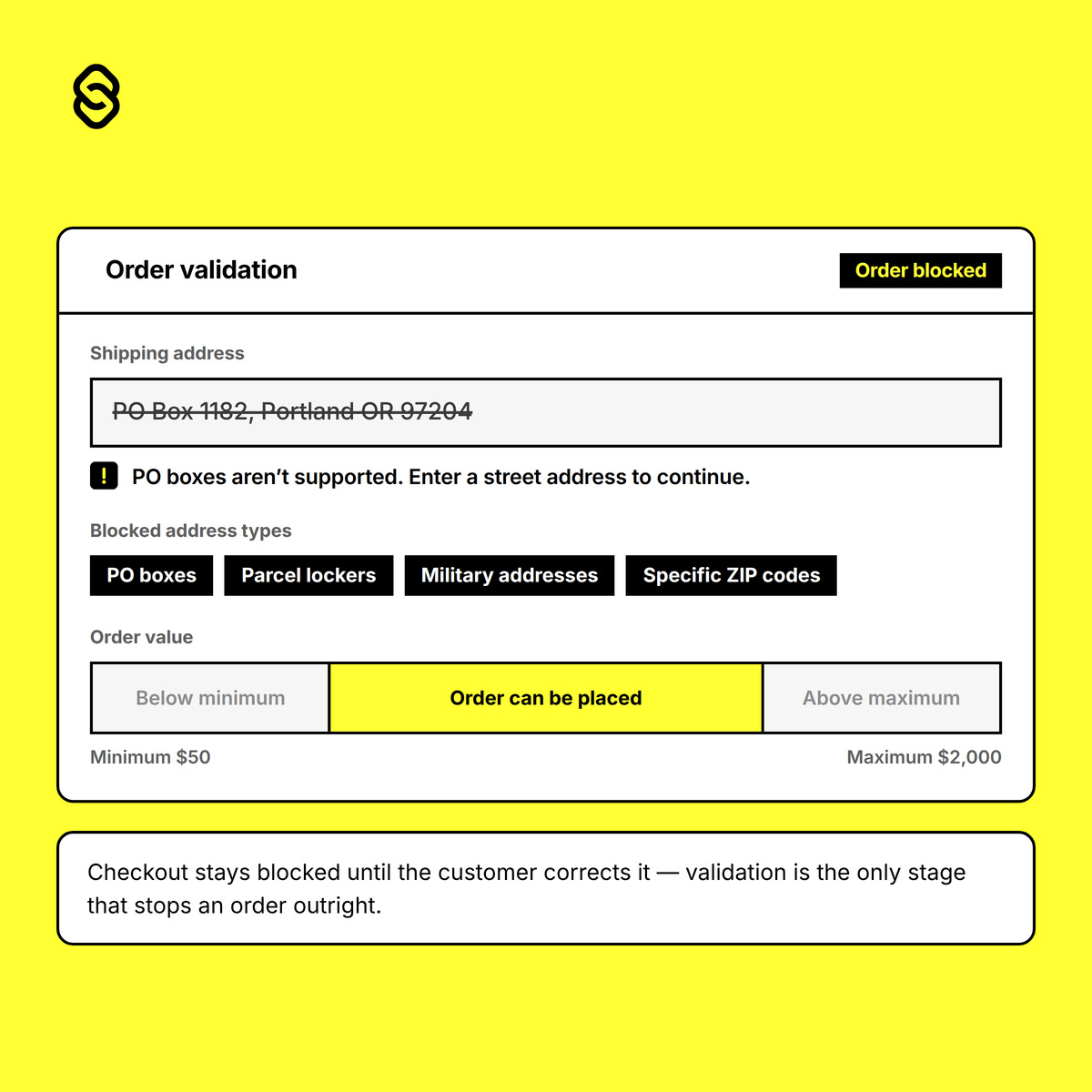
Protect Every Order Before It’s Placed

Validate customer information and prevent unsupported or ineligible orders from being submitted.

  • Block PO Boxes, parcel lockers and military addresses
  • Restrict specific postal codes or delivery locations
  • Require important address fields before submission
  • Enforce minimum or maximum cart subtotals

Native Checkout Automation

Smart Checkout brings promotions, content blocks, order validation, and payment and delivery customisation together in one app. Create targeted checkout experiences without discount codes, theme edits or custom development. Use flexible conditions to decide when each campaign, block or rule should apply, then manage everything directly from your Shopify admin.

Gift CampaignsAutomatic DiscountsCheckout UI BlocksOrder ValidationPayment RulesDelivery Rules
Install Smart Checkout

From Setup to Smarter Checkout in Minutes

Choose What You Want to Customise

Create a gift campaign, automatic discount, checkout block, validation, payment rule or delivery rule.

Define the Conditions

Choose the cart values, products, variants, collections, customers, addresses or locations that determine when it applies.

Configure the Experience

Select the reward, content, validation or checkout change customers should receive. Set campaign priorities, stacking behaviour and gift limits where required.

Schedule and Launch

Set start and end dates, review your configuration and publish it directly from your Shopify admin.

Simple, transparent pricing

Start on the free plan. Upgrade when a campaign earns it.

Free
$0 /month
  • 1 free gift campaign
  • 1 block: cart upsell or free shipping bar
  • Documentation and email support
Starter
$9 /month
  • Adds conditional pricing and volume tiers
  • 3 blocks
  • 1 discount function
  • Scheduling and display conditions
  • Email support
All prices in USD, billed by Shopify every 30 days. Change plans or cancel any time from your Shopify admin. No contracts. Some checkout blocks require Shopify Plus — see what's available on your plan.

Frequently asked questions

Everything you need to know about our products and services.

Upsells and banners on the thank you and order status pages work on every Shopify plan. Blocks inside checkout itself, including gift messages, order notes and delivery date pickers, require Shopify Plus. That's a Shopify restriction on checkout customisation, not one we've set. Everything else, including gifts, discounts, validation and delivery rules, works on any plan.

No code, ever. Cart features like upsells and the free shipping bar are added as app blocks through Shopify's theme editor, so you place them by drag and drop and remove them the same way. Nothing is written into your theme files, and uninstalling leaves no leftover code.

Shopify's native Buy X get Y requires the shopper to add the free item to their cart themselves, or the discount never applies. Smart Checkout adds it automatically when they qualify, and removes it if the cart drops back below the threshold. There's a full comparison above.

You're charged $29 for Pro unless you change plans before the trial ends. You can downgrade or move to the free plan at any time from your Shopify admin.

Your campaigns and rules stop applying immediately and your checkout returns to its default state.

What counts as a block?
A block is one piece of content you've added to your cart or checkout, such as a cart upsell, a free shipping bar, a checkout banner or a gift message field. Your plan sets how many you can have switched on at once. When you reach the limit, everything already running keeps working. You just can't save a new block until you remove one or upgrade.

What counts as a discount function?
A function is one discount or pricing rule running at checkout, such as a volume pricing tier or a conditional discount. Same as blocks: existing functions keep running when you hit your limit, and you'll need to remove one or upgrade before adding another.

Smart Checkout uses Shopify's native discount system, so it respects your combination settings. Shopify allows 25 active automatic discounts at once across all apps, including ours.

Everything runs server-side on Shopify's own infrastructure rather than as JavaScript in the browser, so there's no added page weight and no flash of un-discounted prices.

Your first gift campaign takes about three minutes to set up.

Yes. Pro includes an onboarding session, and we build custom Shopify checkout work through Whiley Mai if you need something the app doesn't cover.

Works with your Shopify plan

Most of Smart Checkout runs on any Shopify plan. A few checkout customisations are limited by Shopify itself, not by us. Here's exactly where you stand.

Basic, Grow, Advanced
Plus
Gift campaigns and automatic discounts
Yes
Yes
Order validation and cart minimums
Yes
Yes
Delivery method rules
Yes
Yes
Payment method rules
Yes, except credit card methods in the US and Canada
Yes, all methods
Blocks on the thank you and order status pages
Yes
Yes
Blocks inside checkout (information, shipping, payment steps)
Shopify Plus only
Yes
Cart upsells, shipping bar and volume pricing
Yes
Yes
Post-purchase upsell on the thank you page
Yes
Yes
Display conditions and scheduling
Yes
Yes
Not sure which applies to your store? Start on the free plan, or email us and we'll confirm before you pay.

Unlock More From Every Checkout With Smart Checkout

Automate gifts and discounts, increase average order value and create a more relevant checkout experience—all from one flexible Shopify app. Launch smarter promotions, collect the information your business needs and control how customers pay and receive their orders.

Install Smart Checkout